Better Docker logs with Python
A Python script that formats docker logs output with colors, scrolling, and search.
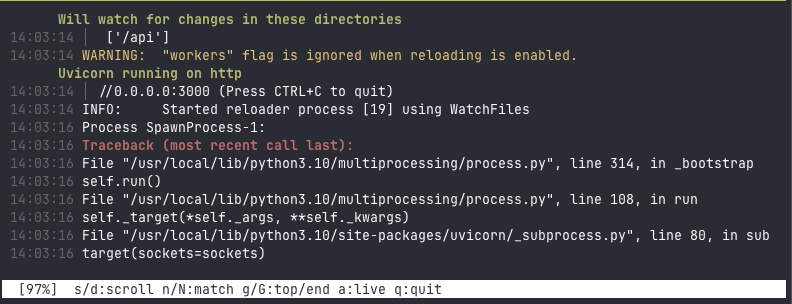
You pipe it like this:
docker logs -f --timestamps my-container 2>&1 | dlogs-fmtEach line is color-coded by log level (red for errors, yellow for warnings, green for info). HTTP requests are parsed and colored by their status code (e.g., GET 200 /path). To keep the output clean, consecutive lines from the same Python module are grouped under a single header.
If you pass --timestamps to Docker, the script strips the ISO date prefix and keeps only HH:MM:SS. When you scroll back you see the original log time, not your terminal’s current time.
Keys
| Key | Action |
|---|---|
s / S | Scroll up / down one line |
d / D | Scroll up / down one page |
↑ ↓ | Scroll one line |
Shift+↑ Shift+↓ | Scroll one page |
e / E | Previous / next error |
w / W | Previous / next warning |
/ | Regex search |
← → | Previous / next search match |
a | Resume live tailing |
Scrolling pauses live output automatically. Error/warning navigation jumps through the full log, not a filtered view, so you keep the surrounding context.
How it works
The status bar stays pinned at the bottom using VT100 scroll regions (rows 1 through N-1 scroll, row N stays fixed). Keyboard input comes from /dev/tty in raw mode since stdin is the pipe. A background thread fills a ring buffer (10k lines by default) so the UI doesn’t block, and only visible lines get formatted on each redraw.
Get it
Single file, no dependencies, Python 3.8+.
Add this to your ~/.bashrc or ~/.zshrc:
dlogs() {
  local container="${1:-my-container}"
  shift 2>/dev/null
  docker logs -f --timestamps "$container" 2>&1 | python3 -u ~/.local/bin/dlogs-fmt "$@"
}